Filtering the Phish Tests
Phish Cutter isn't just used to identify the phish test. It will find real phish, too. However, if you do get phish tested, and if you can't use Phish Cutter because of company policies or platform support, you can easily set up filters in your email client to give you a leg up in identifying Phish tests.
Why Filter Phish Tests?
Simply identifying and deleting the phish test emails is only half the job, according to companies to phish test. You're supposed to report the suspicious email, not simply ignore it.
Also, consider the consequences of falling for test and failing it. They can be severe. Give yourself some help. Don't help your own employer build a case against you.
Step 1: Identifying the Phish Test Headers
This is the hardest part - you actually have to have identified a phish test first. Once you've identified an email that is a phish test, you have to look at the message headers. In Outlook, this is accomplished by clicking on the three dots at the top right of the email message and selecting "View->Details"
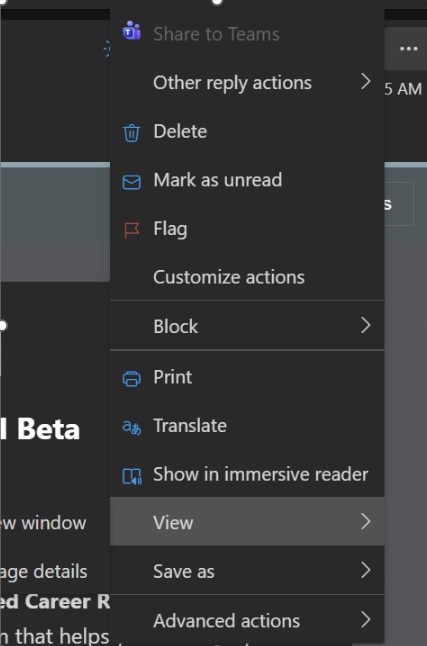
Phishing test vendors use non-standard email headers that enable their phish filtering software to actually allow the tests to your inbox. Otherwise, their own tests would be blocked. Different vendors may use different headers, and many of them allow individual companies to define their own headers, so you may have to do some digging.
Popular headers include:
- x-threatsim-id
- x-phishtest
- x-phishme
- x-phish-crid

Once you've identified which email headers your company uses,then you can create a filter. First create a new folder called "phish tests". Then you can create a rule to put any email that contains an email header with "x-threatsim-id" in the phish test folder.
You can accomplish this by going to outlook settings->Mail->Rules. Create a new rule with the condition that email headers contain "x-threatsim-id" and the action is to put it in the phish test folder.
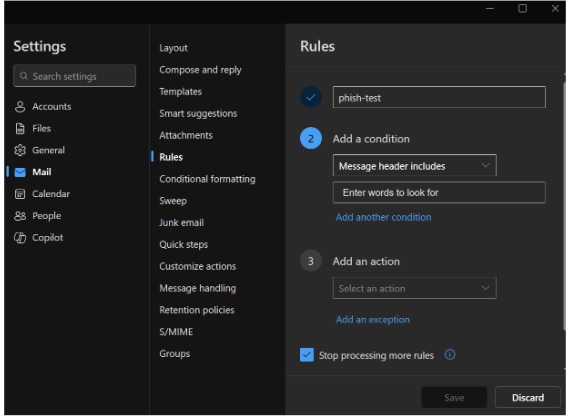
Create this filter and you'll always pass the phish test. Still, be careful, because if your employer ever switches the test provider or decides to use a different email header to identify a test, the rule won't work and you'll have to modify it to look for the new header. This, combined with the other methods that you've been trained on and are described in this site, will give you an advantage.